
JavaScript 方法等等。 第 9 部分 JavaScript 课程从初学者到高级,共 10 篇博文
已发表: 2021-11-09这是 JavaScript 博客文章系列的第 9 部分,它将带您从初学者到高级。 这次我们将探讨以下主题:JavaScript 方法、默认参数值、JavaScript 中的 Date 对象和箭头函数。 在本系列结束时,您将了解开始使用 JavaScript 编码所需的所有基础知识。 如果您还没有阅读上一篇关于 JavaScript 对象的博客文章,您可以在此处阅读。 事不宜迟,让我们开始第九个教程。
JavaScript 方法等 - 目录:
- 默认参数值
- JavaScript 中的 Date 对象
- 地图()方法
- Filter() 方法
- 箭头功能
到目前为止,我们已经在 JavaScript 中看到了许多概念和主题,但仍有一些常用的我们没有发现。 在本教程中,我们将了解它们的全部内容。 第一个是 JavaScript 中的默认参数值。
默认参数值
函数在编程中非常普遍,当使用某些东西时,通常不仅有像 React 这样的框架利用 JavaScript 函数,而且还开发了进一步的优化,甚至可以从 JavaScript 函数中获得更多。 我们在函数中拥有的主要功能之一称为默认参数值。 默认参数允许我们编写更安全的代码,可以对用户输入做出安全的假设。 这也为用户提供了一个默认设置,使他们更容易从他们的选项中进行选择,从而使用户受益。 让我们看一些例子。
// assume you are developing a website for a coffee shop
// and most people want to get a medium size americano
// knowing this you want to make it easir for people to
// order their coffee with less hustle
function orderCoffee(typeOfCoffee="americano", sizeOfCoffee="medium", numberOfCoffee=1){
    return (numberOfCoffee + " " + sizeOfCoffee + " size " + typeOfCoffee + " is being prepared. ");
}
console.log("Default order:");
console.log(orderCoffee());
// this way, when an average customer orders online,
// it will be much easier for them to order their daily coffee
// so much so that they will be able to order it with a single button
// alternatively people can also customize their coffee
// by changing the inputs
console.log("Custom order:");
console.log(orderCoffee("latte", "large", 2));
console.log("Another custom order:");
console.log(orderCoffee("macchiato", "small", 1));
// it is also possible to change only part of the inputs
// and leverage the default parameters
// for the rest of the input fields
console.log("Partially customized order:");
console.log(orderCoffee("iced coffee"));
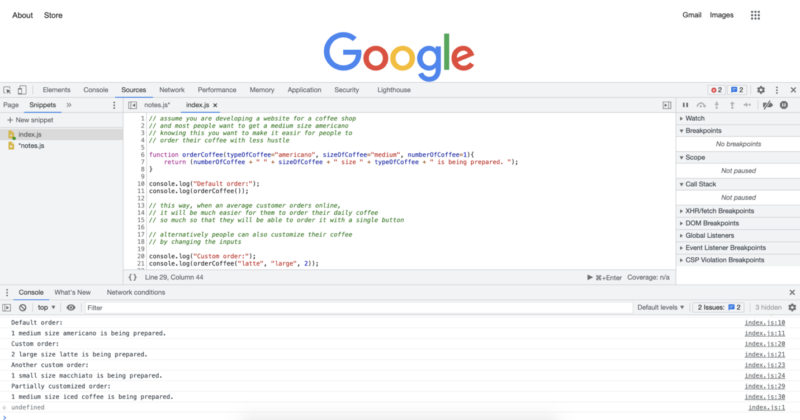
运行上面的代码会给我们以下输出:
JavaScript 中的 Date 对象
JavaScript 中的 Date 对象非常常用,尤其是在 Web 开发中。 我们可以使用 Date 对象来执行时间敏感的功能,例如将显示设置更改为暗模式、亮模式或用户可能喜欢的任何其他模式。 我们还可以在我们正在处理的项目中根据需要使用日期信息。 以下是 Date 对象的一些示例:
// the first step is to create a date object instance
// we cna do this by writing the following and
// setting it to a variable or constant of our choice
let today = new Date();
console.log("We are at year: " + today.getFullYear());
console.log("We can also get month in number:");
console.log(today.getMonth());
console.log("Also we can get the hour of the day like this:");
console.log(today.getHours());
console.log("We can also get the exact minutes along with the seconds");
console.log(today.getMinutes());
console.log(today.getSeconds());
// once we have these numbers we can use them as we like
// if we want we can display them or make decisions based on them.
// if we want to display month with a name
// rather than a number, we can also achieve that
// with the following
const months = ["January", "February", "March", "April", "May", "June", "July", "August", "September", "October", "November", "December"];
console.log("We are at the month of " + months[today.getMonth()]);
// what we just did was to create an array to store month names
// and then choose the correct month using an index value
// provided by the .getMonth() method.
// if we wanted to turn on dark mode after 8 pm,
// we could do that with the following code
// one of the first thing we should remember is that
// hours are given in the 24 hour format
// that means 8pm will mean 20 as hours
// we can also use a short hand way
// and combine the new date object creation
// with the get hours method
let timeOfDay = new Date().getHours();
if (timeOfDay >= 20) {
    console.log("Turning on Dark Mode...");
} else {
    console.log("Do not turn on the Dark Mode");
}
// since current time is over 8pm,
// in this case we expect to get turn on Dark Mode.
// which is also the reuslt we get as we can see from
// the console output.
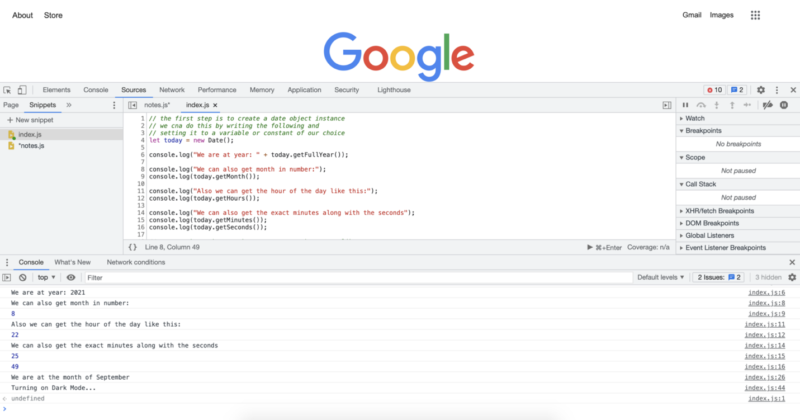
运行上面的代码将为我们提供以下控制台日志:
地图()方法
map 方法是一种非常有用的方法,它可以为您节省许多代码行,并且根据您的使用方式,它可以使您的代码更加简洁。 当您使用 for 循环遍历数组时,它基本上取代了使用 for 循环。 以下是 map() 方法的一些示例。
// lets create an array we will use for mapping
let someNumbers = [1, 2, 3, 4, 5];
// lets also create the functions we will
// provide to the map method
function doubleNums(num1){
    return num1 * 2;
}
function squareNums(num1){
    return num1 * num1;
}
function add100(num1){
    return num1 + 100;
}
console.log("Doubled numbers array:");
console.log(someNumbers.map(doubleNums));
console.log("Squared numbers array:");
console.log(someNumbers.map(squareNums));
console.log("100 added to each of the element in the umbers array:");
console.log(someNumbers.map(add100));
// map() method will loop over each of the
// items in a given array and apply the
// provided function
// note that we do not include paranthesis
// after the function names, this would call the function
// instead we pass the function name,
// and map() method calls them when it needs to
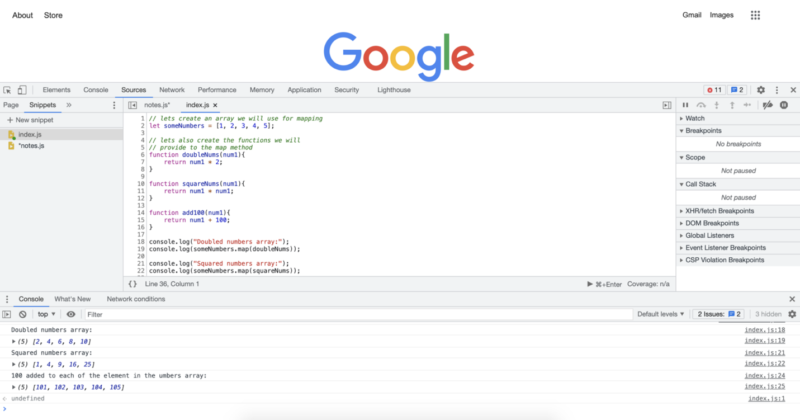
运行上面的代码将为我们提供以下控制台日志:

Filter() 方法
filter() 方法和 map() 方法都是非常常见的 JavaScript 方法。 它们与我们刚刚看到的 map() 方法非常相似。 使用 map() 方法,我们可以传入任何函数,并且该函数被应用于数组中的每个元素。 使用 filter() 方法,我们将传入一个过滤条件,该过滤器方法将遍历数组中的所有项目,它会返回一个新数组,其中仅保留通过条件的项目。 让我们看一些例子:
// lets first create an array
// to apply the filter() method
let someNumbers = [1, 2, 3, 4, 5, 6, 7, 8, 9, 10, 11, 12, 13, 14, 15, 16, 17, 18, 19, 20, 21];
function checkEven(num1){
    if (num1 % 2 == 0){
        return num1;
    }
}
function checkOdd(num1){
    if (num1 % 2 == 1){
        return num1;
    }
}
function over13(num1){
    if (num1 > 13){
        return num1;
    }
}
function divisibleByFive(num){
    if (num % 5 == 0){
        return num;
    }
}
console.log("Even numbers from the list:");
console.log(someNumbers.filter(checkEven));
console.log("Odd numbers from the list:");
console.log(someNumbers.filter(checkOdd));
console.log("Numbers over 13 from the array:");
console.log(someNumbers.filter(over13));
console.log("Numbers divisible by 5 from the array:");
console.log(someNumbers.filter(divisibleByFive));
运行上面的代码将为我们提供以下控制台日志: 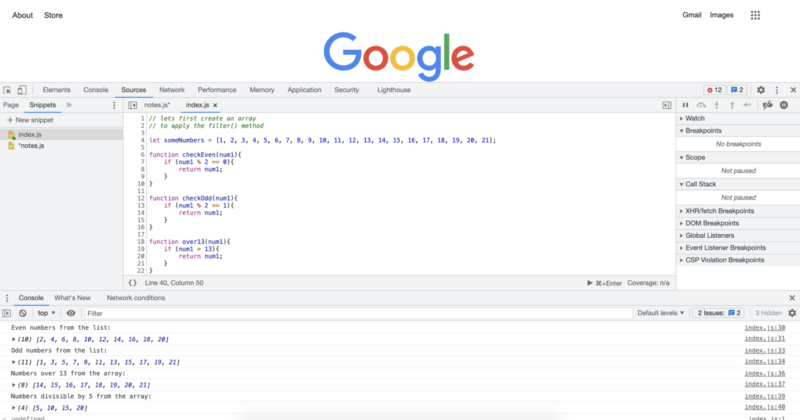
箭头功能
还记得我们说过函数在 JavaScript 中非常常见,并且对它们进行了许多优化,甚至可以获得更高性能或更简洁的代码吗? 好吧,箭头函数就是其中之一。 箭头函数有时也称为胖箭头。 它们本质上提供了一种更短的方法来编写你的函数。 它们也非常常用于我们刚刚看到的 JavaScript 方法。 让我们用一些例子来看看它们:
// JavaScript provides multiple levels of
// code shortening with arrow functions depending on your exact code
// Essantially the longest way we can write a function is
// the way we always write them without using the arrow functions
// lets start with an array to apply the arrow functions
let someNumbers = [1, 2, 3, 4, 5, 6, 7, 8, 9, 10, 11, 12, 13, 14, 15, 16, 17, 18, 19, 20, 21];
console.log("Original Array:");
console.log(someNumbers);
// in the previous examples we have applied many functions
// after creating them as regular named functions
// In this example we will apply the exact transformations
// so that you can see the both extremes in code lenght
// double every number in the array:
console.log("Double every number in the array:")
console.log(someNumbers.map(num => num * 2));
// square every number in the array:
console.log("Square every number in the array:")
console.log(someNumbers.map(num => num * num));
// add 100 to every number in the array:
console.log("Add 100 to every number in the array:")
console.log(someNumbers.map(num => num + 100));
// Only keep the even numbers in the array:
console.log("Only keep the even numbers in the array:")
console.log(someNumbers.filter(num => num % 2 == 0));
// Only keep the odd numbers in the array:
console.log("Only keep the odd numbers in the array:")
console.log(someNumbers.filter(num => num % 2 == 1));
// Only keep the numbers that are evenly divisible by 5:
console.log("Only keep the numbers that are evenly divisible by 5:")
console.log(someNumbers.filter(num => num % 5 == 0));
// Only keep the numbers that are over 13:
console.log("Only keep the numbers that are over 13:")
console.log(someNumbers.filter(num => num > 13));
运行上面的代码将为我们提供以下控制台日志:
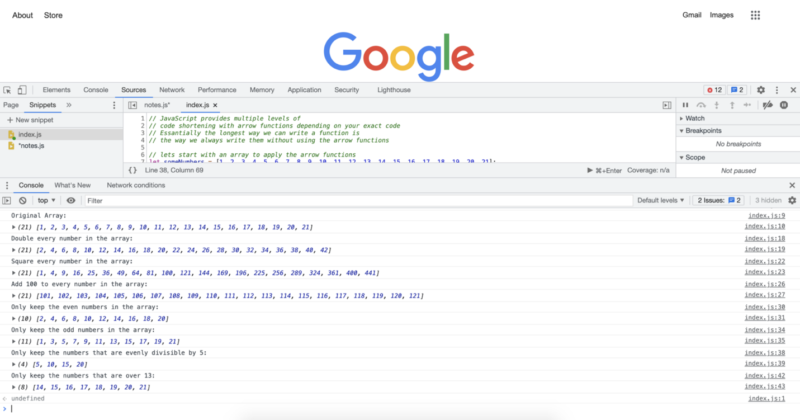
在下一个教程中,我们将概述我们已经看到的内容并看看接下来会发生什么。


作者:罗伯特·惠特尼
JavaScript 专家和指导 IT 部门的讲师。 他的主要目标是通过教其他人如何在编码时有效合作来提高团队生产力。
10 篇博文中从初级到高级的 JavaScript 课程:
- 如何开始用 JavaScript 编码?
- JavaScript 基础
- JavaScript 中的变量和不同的数据类型
- 片段和控制结构
- While 循环和 for 循环
- Java 数组
- JavaScript 函数
- JavaScript 对象
- JavaScript 方法等
- JavaScript 课程总结